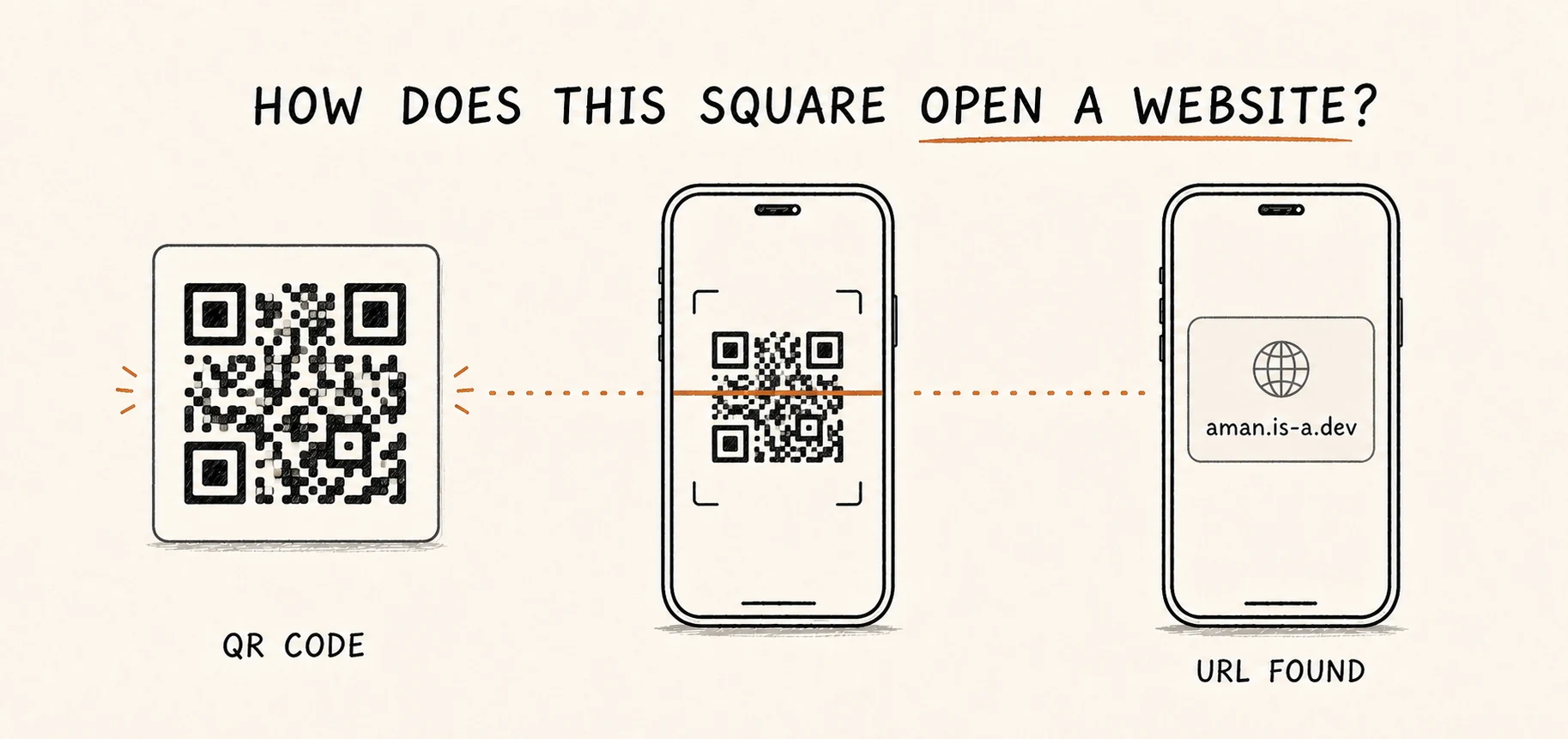
You point your camera at a square made of black and white blocks. A moment later, a website appears.
It feels like the square somehow contains the whole website.
It does not.
A QR code usually stores a small piece of data, such as this URL:
https://aman.is-a.dev
The phone first reads that text from the square. Then the camera app asks whether you want to open it.
Those are two separate jobs:
- The QR code helps the phone recover the data.
- The app decides what to do with that data.
Let’s follow https://aman.is-a.dev into a QR code and back out again.
The short version
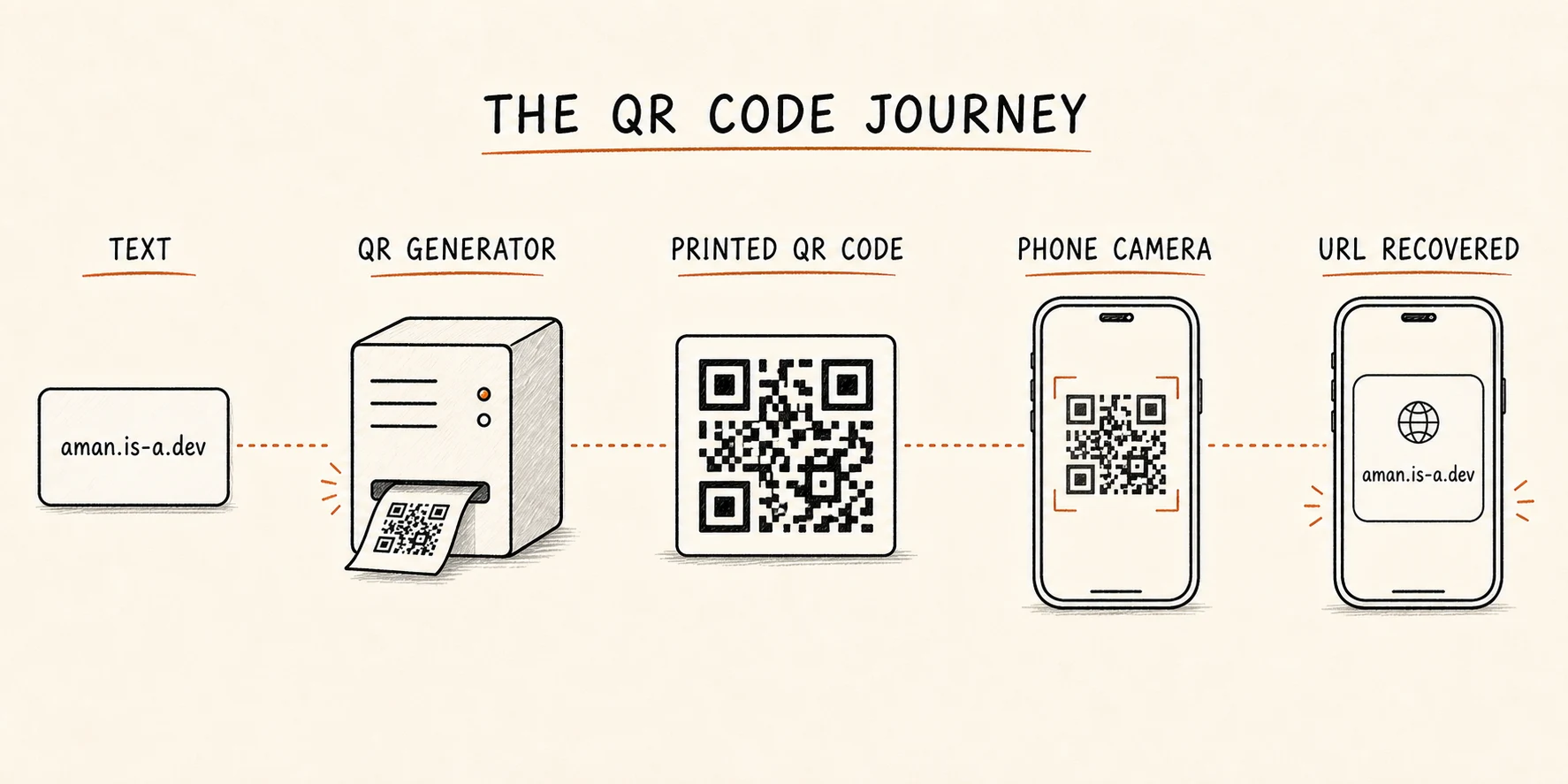
The full journey is:
- A QR generator turns the URL into numbers.
- It adds extra information that can help recover small damaged parts.
- It arranges everything inside a square grid.
- A phone camera finds that grid and straightens the image.
- The scanner reads the blocks and rebuilds the URL.
- The app shows the URL and decides what can happen next.
The most useful thing to remember is:
A QR code stores data. It does not open a website by itself.
A QR code is a grid of tiny squares
The small black and white squares are called modules.
You can think of them as the cells in a sheet of graph paper. Each cell is either dark or light.
Some modules carry the message. Others help the camera find and read the grid.
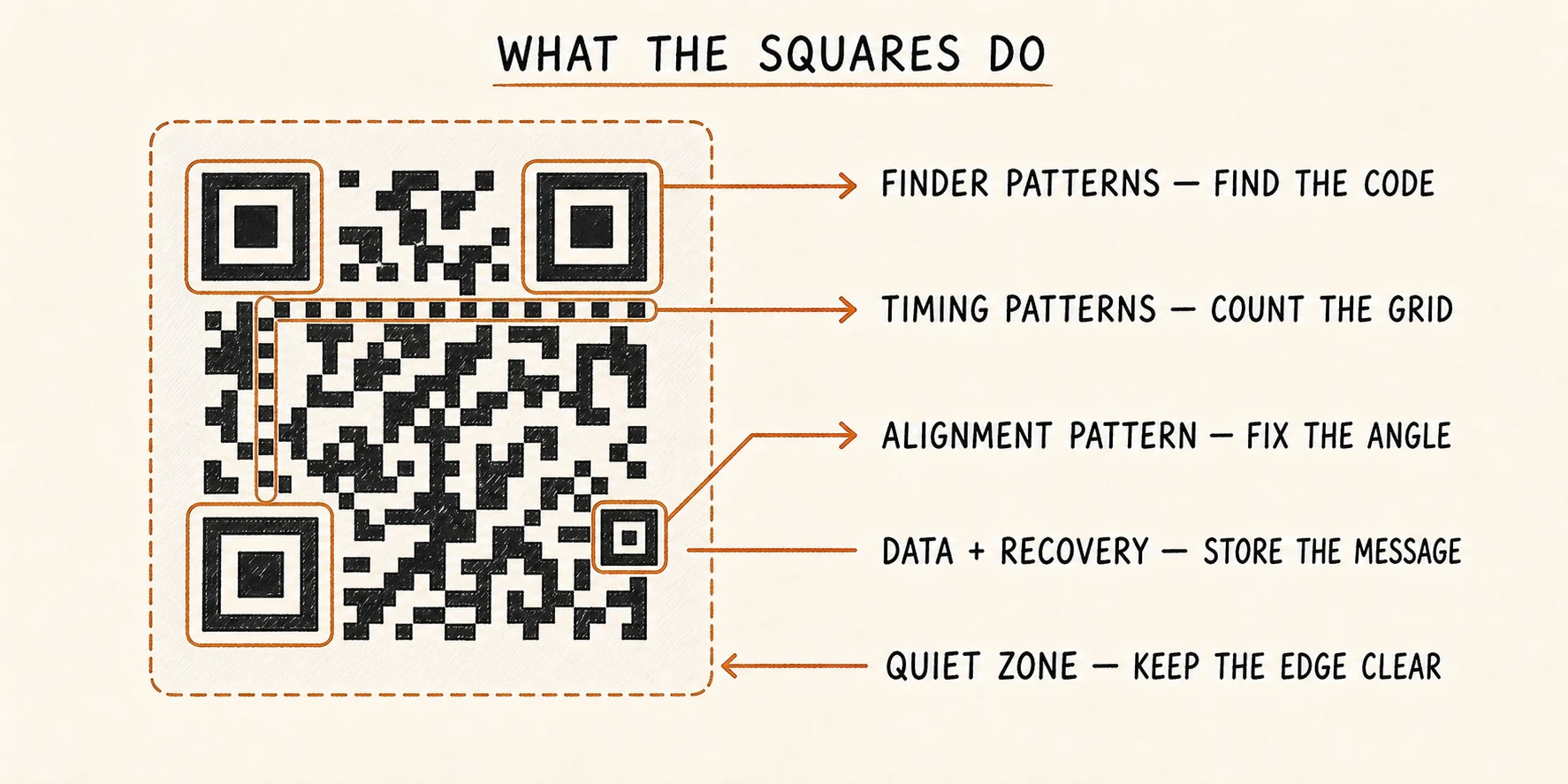
The three large corner squares find the code
The large squares in the top-left, top-right, and bottom-left corners are called finder patterns.
They help the phone answer three questions:
- Where is the QR code in this camera image?
- How large is it?
- Which way is it turned?
Because the pattern appears in three corners, the phone can still understand the code when you hold your camera sideways or at an angle.
The striped lines help count the grid
Between the large corner squares are alternating dark and light modules. These are timing patterns.
They act like the marks on a ruler. They help the scanner work out the rows, columns, and size of each module.
The smaller square helps fix the angle
Larger QR codes contain one or more smaller alignment patterns.
They help when the code is tilted, curved, or viewed from an angle. The scanner uses them while turning the camera image back into a neat square grid.
The empty border keeps the edge clear
A QR code needs blank space around it. This is called the quiet zone.
It separates the code from nearby text, borders, and pictures. Without that clear edge, the camera may struggle to see where the QR code starts and ends.
The blank space may look unused, but it is part of making the code easy to scan.
How a URL becomes black and white blocks
Now let’s put this URL into the grid:
https://aman.is-a.dev
1. The text becomes numbers
Computers store text as numbers. The QR generator converts the letters, dots, slashes, and other characters into a stream of bits: 0s and 1s.
It also adds a little information about how the message was stored and how long it is. That helps the scanner understand the bits later.
The exact rules can change depending on the data. A QR code containing only digits can store them more efficiently than one containing a lowercase URL.
2. Extra recovery data is added
Printed things get scratched. Screens have glare. Cameras blur. A label can collect dust.
QR codes prepare for this by storing extra recovery data alongside the message. The system uses a method called Reed–Solomon error correction.
The name sounds complicated, but the purpose is simple:
Store enough extra clues so that some missing pieces can be rebuilt later.
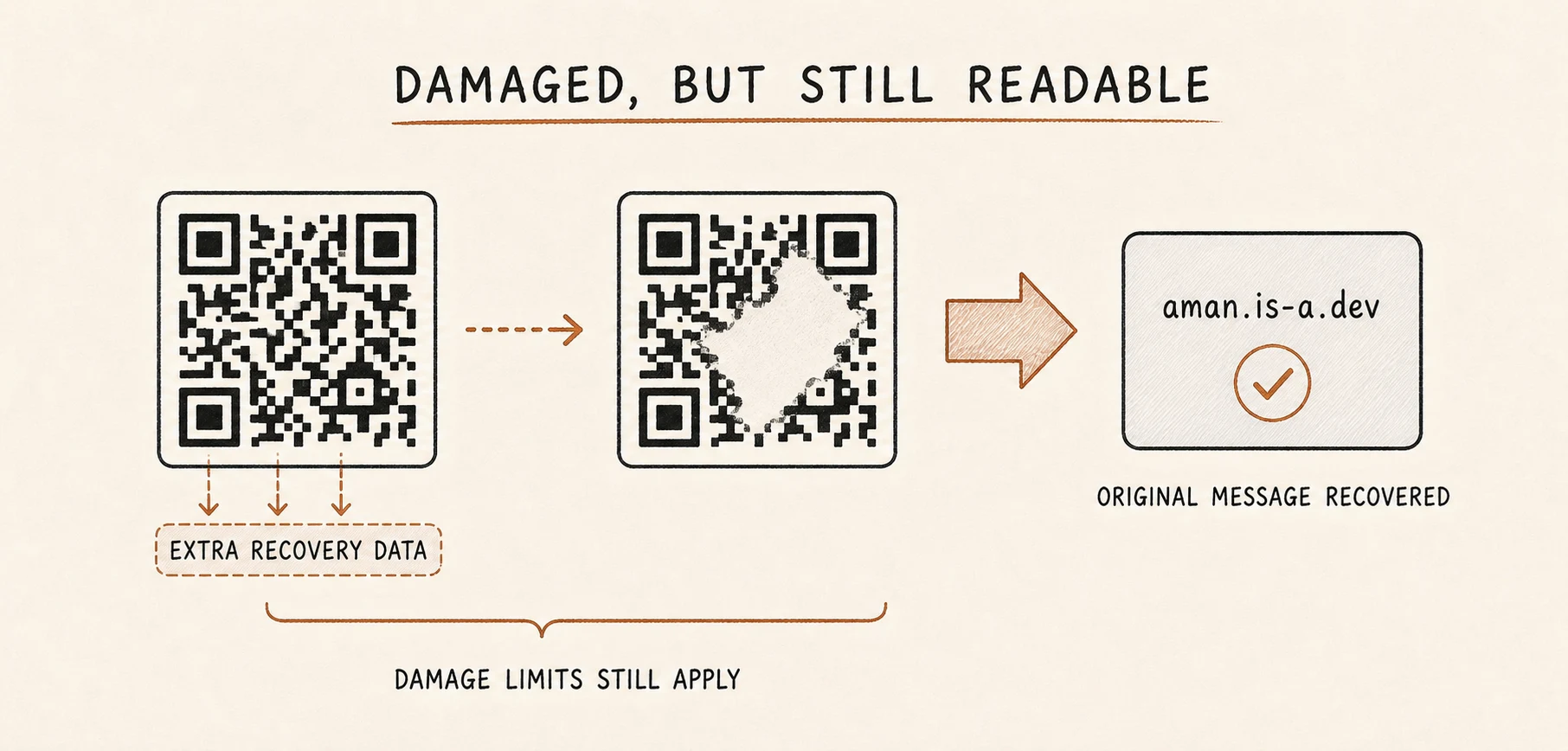
This does not make a QR code indestructible. Too much damage can still make it unreadable, especially if an important corner pattern is covered.
Higher error-correction settings store more recovery information. The tradeoff is that less space remains for the original message, so the QR code may need to become larger or denser.
3. Everything is placed into the grid
The generator reserves space for the finder patterns, timing patterns, alignment patterns, and a small amount of reading information.
It then places the message and recovery bits into the modules that remain.
The bits do not simply run from left to right like a sentence. They follow a fixed path through the grid so every compatible scanner knows where to look.
4. The generator tidies the pattern
Some data can accidentally create awkward patches: long dark lines, large solid blocks, or shapes that look too similar to the corner patterns.
These patterns are harder for cameras to read.
The generator therefore tries a few reversible arrangements, called masks, and chooses the one that produces the clearest-looking grid. The scanner is told which mask was used so it can reverse that step.
A mask is not encryption. It makes the code easier to scan; it does not hide the message.
The QR code is now ready to print or show on a screen.
How the phone gets the URL back
The phone does the same work in reverse, but it starts with a messy camera image rather than a perfect square.
1. The camera finds the three corner patterns
The code might be small, rotated, dim, or tilted. The scanner searches the image for the special three-corner pattern.
Once it finds those corners, it knows where the QR code is and how it is turned.
2. The scanner straightens the image
When you photograph a square from the side, it looks more like a slanted diamond or trapezoid.
The scanner uses the finder and alignment patterns to correct that perspective. It turns the photographed shape into a regular square grid again.
3. It samples every module
The timing patterns help the scanner estimate the center of each row and column.
It checks those positions and builds a clean logical grid: dark module or light module.
At this point, the phone is no longer working with a photograph. It is working with a neat map of the QR code.
4. It reverses the mask and reads the data
The scanner reads the small pieces of information that describe the QR code. It learns which mask and error-correction setting were used.
It reverses the mask, follows the defined path through the modules, and collects the message and recovery data.
5. It repairs what it can
If a few pieces are missing or wrong, the error-correction data may be able to rebuild them.
If the damage is within the code’s limits, the scanner recovers the original text:
https://aman.is-a.dev
The QR-reading job is now finished. The phone did not need the internet to decode the square. It only needs a network if you choose to visit the website.
Scanning is not the same as opening
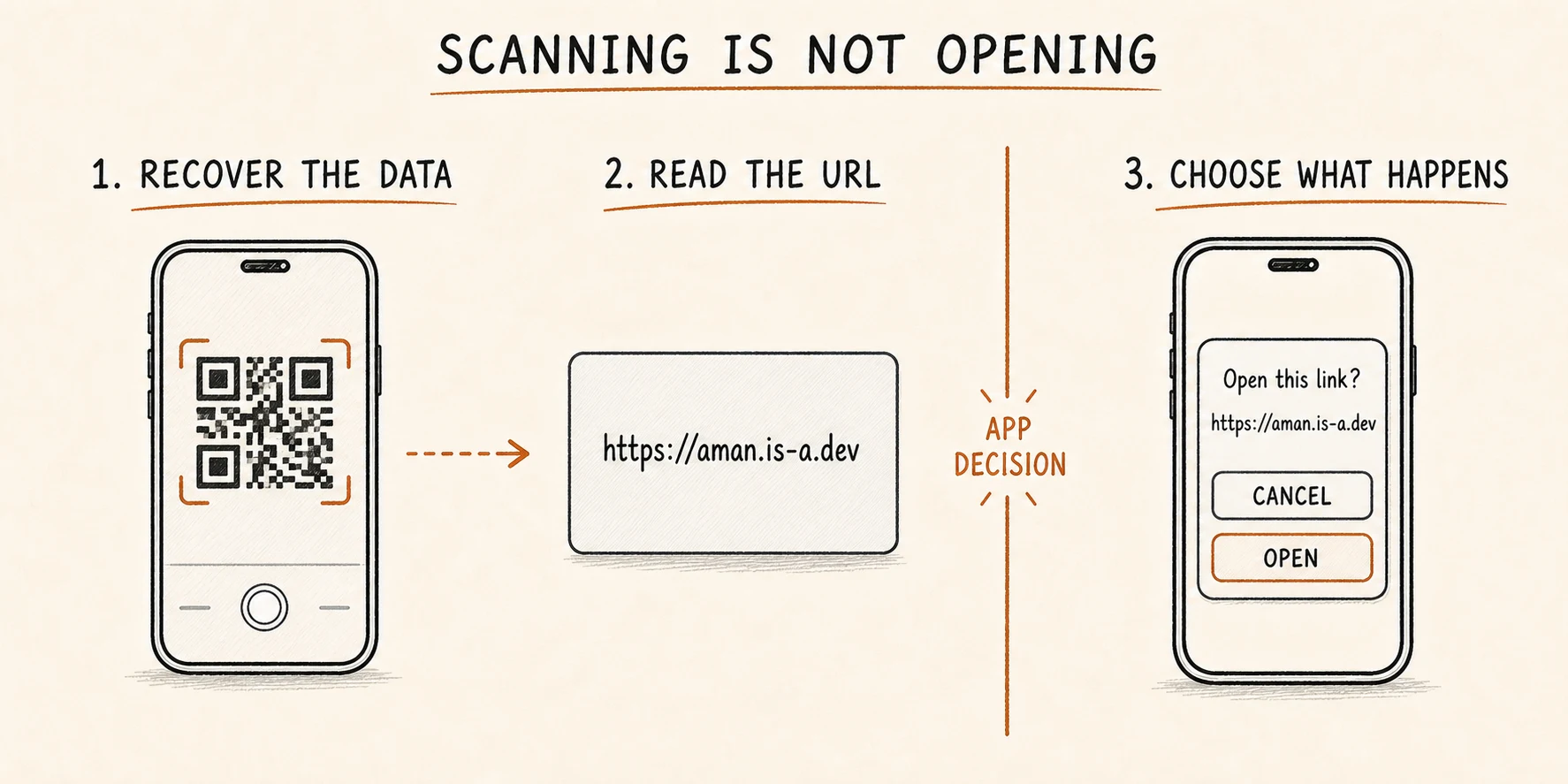
The scanner has recovered a string of text. The camera app now decides how to present it.
If the text looks like a web address, the app may show an Open button. If it contains Wi-Fi details, the app may offer to join a network. If it contains ordinary text, the app may only offer to copy it.
For a URL, the journey can continue like this:
QR code
  → URL recovered
  → user chooses Open
  → browser or app handles the URL
  → network request begins
This boundary explains two things that often cause confusion.
First, a QR code can hold more than a link. It can store plain text, contact details, Wi-Fi settings, or other small pieces of data.
Second, a so-called dynamic QR code does not change after printing. It usually stores a short web address. The server behind that address can later redirect visitors somewhere else. The printed squares stay the same; the server changes the destination.
A readable QR code is not always a safe QR code
Error correction can tell the scanner, “I recovered the same data that was printed.”
It cannot tell you:
- who printed the code;
- whether someone placed a new sticker over the original;
- whether the recovered website belongs to the organization you expect;
- whether that website will redirect you somewhere else;
- whether the final page is safe.
A harmful QR code can be perfectly clear and technically valid.
Before opening an unfamiliar code, read the destination shown by the scanner. Be especially careful with codes that lead to payments, sign-in pages, or app downloads.
For software that controls a QR flow, the same rule becomes: validate the kind of data you expect, allow only trusted URL schemes and domains, and verify important actions on a server.
Common misunderstandings
“A QR code is a website.”
No. It can store a URL, which is only the address of a website.
“The camera understands the picture instantly.”
The scanner first finds the code, straightens it, samples the grid, repairs recoverable errors, and rebuilds the stored data.
“Every black square is one bit from the message.”
No. The grid also contains location patterns, timing patterns, reading information, padding, and recovery data.
“The mask hides the message.”
No. Masking is a public, reversible step that makes the pattern easier to scan.
“Error correction means I can cover a large part with a logo.”
Not safely. Recovery depends on the amount and location of the damage. Covering the wrong area can stop detection before recovery even begins.
“A successful scan means the code is trustworthy.”
No. It only means the scanner recovered a valid payload.
The 30-second mental model
When you scan a QR code, remember this sequence:
- A generator turns data into bits.
- It adds extra recovery data.
- It arranges everything inside a grid with patterns that help a camera find and read it.
- The phone finds the grid and corrects the camera angle.
- The scanner reads the modules, repairs some damage, and rebuilds the stored data.
- The app decides what to do with that data.
The shortest accurate summary is:
The QR code tells the phone what data was printed. The app decides what happens next.
Once that boundary is clear, a QR code stops looking like a magical square that opens websites. It becomes a careful way to move a small message from the physical world into an app.
Further reading
- What is a QR Code? — DENSO WAVE
- QR Code versions and capacity — DENSO WAVE
- QR Code error correction — DENSO WAVE
- QR Code quiet zone — DENSO WAVE
- ISO/IEC 18004:2024 public summary
- ZXing QR Code scanner and decoder
QR Code is a registered trademark of DENSO WAVE INCORPORATED.